From Fragile Pipelines to Durable Workflows
At Joko, we’re building Juno: an AI shopping agent that helps people find the right product at the right price across thousands of merchants. To do that well, Juno needs a fresh, accurate, and complete view of what’s for sale on the internet: which means continuously ingesting and standardizing a very large product catalog (we’re talking about hundreds of millions of products).
That catalog is where this story starts.
1. Workflows look simple! Nope, they aren’t.
Joko’s product catalog ingests millions of product offers from thousands of merchants every day. A single ingestion looks quite simple when you draw it on a whiteboard:
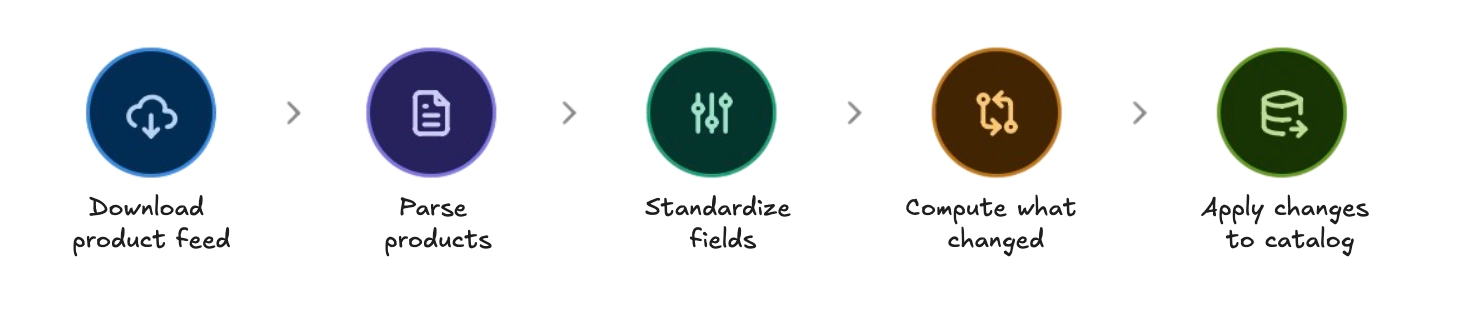
“Five boxes and four arrows. How hard can it be?” says probably you.
Then you look at the numbers. We ingest product offers from merchants through product feeds. A feed can correspond to an entire merchant’s catalog, or it can cover just a single product category. For example, we currently ingest 63 feeds for Amazon alone. A feed can be a 4 GB compressed file or even larger. Parsing it yields 5 million product offers. Applying a day’s worth of changes can mean more than 1 million updates and deletes. The whole thing is long-running, failure-prone, and because the freshness of the catalog directly affects what Juno recommends and what the user will see it absolutely has to be observable.
Here are the problems we kept running into. Maybe some problems that you are currently running into as well.
🔥 All-or-nothing execution
If a step failed 80% of the way through, for any reason, there was no “resume”. The entire pipeline restarted from scratch. For a 4-hour ingestion, re-doing everything because of one flaky HTTP call is catastrophic.

🌀 Ad-hoc orchestration
Each multi-step pipeline was wired together by hand: manual message passing, custom state tracking, bespoke retry logic. Every new pipeline reinvented the wheel: different patterns, different failure modes, different ways of (not) being observable.

🥽 No visibility into running pipelines
“Is the nightly ingestion done?” “Which feeds failed?” “How far along are we?” Answering any of these meant grepping through logs. No dashboard, no progress bars, no structured error reporting.

🍾 Sequential bottlenecks
Processing 500 feeds one by one when they could run in parallel. Standardizing batches sequentially when five workers would finish 5× faster. Rate-limiting against external APIs by hand, and getting it subtly wrong.

👭 Testing coupled to infrastructure
Business logic was tangled up with infrastructure concerns (interactions with AWS SQS, DynamoDB, S3, etc.). Testing a pipeline meant deploying infrastructure or mocking the AWS SDK: slow, brittle, and not representative of what actually happens in production.
🧱 Lambda’s 15-minute wall
We run on AWS Lambda, and a Lambda invocation is capped at 15 minutes. Downloading a 2 GB feed, parsing 5M offers, or applying 500K updates does not usually fit in 15 minutes. Before the engine, the only options were over-provisioning infrastructure or hand-rolling fragile “chunking” logic for every single pipeline.

“Why insist on Lambda? Why not just run this on a big machine or on Kubernetes?"
It’s the first question every engineer asks, so let’s answer it head-on.
Serverless is a deliberate fit for Joko. We’re a B2C app with millions of daily users, traffic that’s genuinely hard to predict, strong growth, and frequent, sudden spikes. A serverless architecture, with AWS Lambda as its cornerstone, lets us absorb those spikes seamlessly, with a very reasonable amount of infrastructure effort. We don’t spend our time forecasting traffic and provisioning fleets to survive the next peak; the platform scales to meet demand and scales back down when it’s gone.
The same logic applies to the product catalog. We add new product feeds regularly, and the ingestion workload swings a lot from one day to the next, a big merchant refresh here, a quiet day there. Rather than sizing servers for the worst case and babysitting them, we let the same serverless model absorb the variability, so we can keep our attention on our core business instead of on capacity planning.
✨ Here is the point of this very blog post: what we achieved from this.
All of our pipelines run on a custom durable workflow engine that handles parallelization, crash recovery, and progress tracking out of the box — and it has since spread well beyond feed ingestion.
But now you must think, why bother doing it ourselves when solutions already exist?
2. Build vs. Buy
This is the section everyone wants to argue about, so ✨here it is✨.
Temporal is everywhere. Inngest is popular. AWS, GCP, and Azure all ship workflow products. So: why on earth build our own?
We didn’t decide this on a whim. We evaluated the main contenders in depth before we wrote a line of our own engine. Here’s what we found.
🛠️ Temporal and Inngest: great tools, wrong shape for us
-
Neither gives us long-running steps within a serverless model, and serverless is a hard requirement for us (see above). This one is nuanced, so let’s be precise about what each tool actually gives you. Our problem is the opposite of what most orchestrators assume. We want a workflow that runs for ten hours and is actively processing data for those ten hours — on AWS Lambda, which means a 15-minute timeout per execution, non-negotiable.
- Temporal can run a single activity for hours, but only by giving up serverless. You operate long-lived worker processes, manage timeouts yourself, and use its heartbeat mechanism to keep the activity alive across that time. That’s a real capability, just not a serverless one: the moment a step needs to run for hours, you’re back to provisioning and babysitting worker fleets, the exact operational burden we adopted Lambda to avoid.
- Inngest stays serverless: each step runs as a serverless function invocation, which is the model we want. But that means a step inherits whatever wall its underlying compute imposes: on Lambda, 15 minutes. And unlike Temporal, there’s no escape hatch (no heartbeat, no long-running worker option) for a step that needs more time than the platform gives it.
So the honest framing isn’t “these tools can’t do long work.” It’s that getting long, actively-computing work done the serverless way meant either giving up serverless entirely (Temporal) or hitting a hard wall with no way through (Inngest). Building that resume-across-invocations logic into our own engine, tailored to Lambda, was cleaner than fighting either tool’s assumptions.
-
You lose flexibility. Off-the-shelf orchestrators ask you to fit your problem into their model. We needed control over batching, checkpointing, parallelism, and how steps map onto our infrastructure. Building in-house was a bet, you never really know until you’ve done it.
-
You marry a vendor. Neither is meaningfully open in a way that protects you long-term: adopting them means coupling a core part of your platform to someone else’s product and roadmap. For something as central as “how all our background processing works”, that’s a serious bet in a specific direction.
What about AWS Step Functions (and the GCP/Azure equivalents)?
These have a subtler trap. With Step Functions and friends, you describe your workflow in a domain-specific language (JSON, YAML, or a visual editor). That sounds convenient until you realize that a workflow definition is business logic. The order of steps, the branching, the retry policy: that’s real product behavior.
Pushing that logic into a cloud-vendor Domain-Specific Language (DSL) means:
- Part of your business logic now lives in a language you don’t fully control, outside your normal codebase, untested by your normal tests.
- It looks lovely in a console UI until you realize that editing the workflow means editing production in a UI, with none of the safety of code review, type-checking, or a deployment pipeline.
You just want your workflows to be in your favorite programming language (TypeScript, Go, Rust, etc.).
🤷♀️ “Just drop your serverless architecture, then?”
The other common suggestion: “forget Lambda, run this on a big machine you control, and the 15-minute limit disappears. Problem solved, right?”
Thanks, rhetorical fictional blogpost character, but not really. Serverless is a deliberate choice for us, not a limitation (see above). And even if the 15-minute wall didn’t exist, we’d still build workflows this way. The structure isn’t a workaround for Lambda; it would earn its place on a machine with no time limit at all, because it solves problems that have nothing to do with timeouts:
- It prevents a whole class of bugs. Isolated, short-lived steps mean no slow memory leaks creeping across a ten-hour run.
- It lets you pause and resume anywhere. A single long script can’t checkpoint itself; a stepped workflow can.
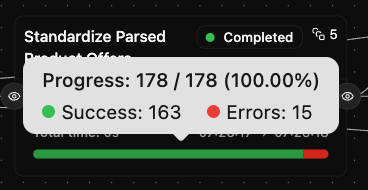
- It gives you tracking and a generic UI for free. Because every pipeline is described the same way (steps, dependencies, progress counters) you can build one dashboard that visualizes all of them.
So we built one. Here’s how it works.
3. The engine’s architecture (in brief)
To understand how the engine is built, you need to be comfortable with one idea from hexagonal architecture (also known as “ports and adapters”). It’s not something we invented and I promise to keep it simple.
The idea is to separate what your code needs to do from how it’s actually done. A port is a small interface that describes a capability your core logic depends on (for example, “something that can store a value”) without saying anything about the technology behind it. An adapter is a concrete implementation of that port: one adapter might store the value in DynamoDB, another in memory. Your core logic only ever talks to the port, so you can swap adapters freely without touching it. It’s the same principle as a wall socket: your appliance plugs into a standard port and doesn’t care what’s generating the electricity behind it.
With that in mind, the engine’s design is straightforward. The WorkflowEngine is the brain: it knows about workflows, steps, dependencies, and how to react when a step finishes. It knows nothing about AWS. Everything it needs from the outside world goes through a port, with an adapter plugged in behind it:
| Port | Production adapter | What it does |
|---|---|---|
StepLauncher |
SQS (Simple Queue Service): Managed message queuing for decoupled apps | Queues the next step to run, asynchronously |
ExecutionStateManager |
DynamoDB: Managed NoSQL key-value/document database | Remembers the status of every step |
ExecutionDataManager |
S3 (Simple Storage Service): Scalable object storage for files | Stores each step’s input and output |
StepDeferrer |
DynamoDB + a cron | Schedules steps that asked to wait |
Here’s the production flow, at a glance:
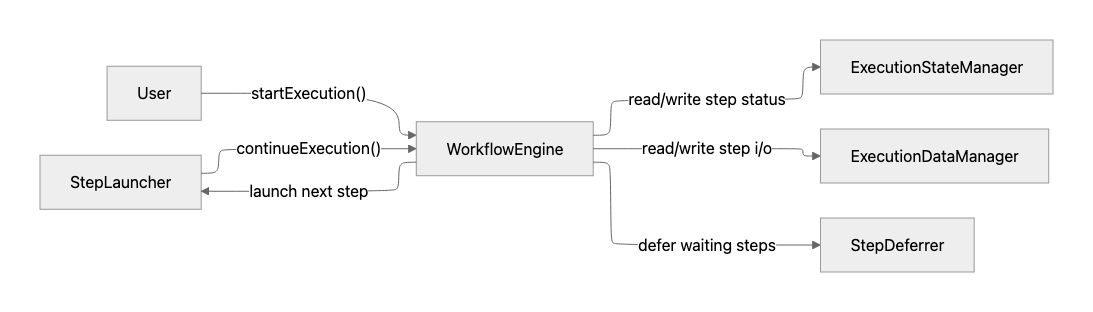
The payoff of drawing that line is two modes, one API:
- Production mode is distributed and asynchronous: steps hop through SQS, state lives in DynamoDB, data lives in S3. This is what survives timeouts and crashes.
- In-memory mode is synchronous and needs zero infrastructure. Same workflow definition, but the adapters are swapped for in-memory ones. The power of hexagonal architecture is that the ports stay the same, only the adapters change, and it’s very easy to switch from one mode to another. This is what we use in tests and for short batch jobs.
And the way a step communicates with the engine is a tiny protocol as every step returns exactly one of these results:
| Result | Meaning |
|---|---|
complete(output) |
Done. Save the output for dependent steps. |
fail(error) |
This step failed; mark the workflow failed. |
wait(duration) |
Pause it, wake it later (e.g. polling). |
interrupt(partial) |
We’re out of time — save the progress and re-launch. |
stop() |
Halt the whole workflow. |
That’s the entire vocabulary. Everything in the next section is built out of these five verbs.
4. How it solved each problem
The best way to understand the engine is to watch one real pipeline use every feature. So meet our running example: ingest-complete-feed, the workflow that ingests a full product feed and follows this logic:
The “Compute what changed” part is composed of the generation of product offer hashes and the associated change set compared to a reference hash. Below is its actual definition in our codebase (lightly trimmed). Notice we never write the wiring by hand: a workflow is declared, not programmed: just an object naming each step and its dependencies, and the engine figures out the execution order.
workflowEngine.registerWorkflow({
  code: INGEST_COMPLETE_FEED_WORKFLOW_CODE,
  steps: {
    "download-feed-data": {
      code: "download-feed-data",
      execute: downloadFeedDataStep,
    },
    "parse-feed-data": {
      code: "parse-feed-data",
      execute: parseFeedDataStep,
      dependsOn: ["download-feed-data"],
    },
    "standardize-parsed-product-offers": {
      code: "standardize-parsed-product-offers",
      execute: standardizeParsedProductOffersStep,
      dependsOn: ["parse-feed-data"],
      parallelization: 5,
      inputPropertyToSplit: "parsedProductOfferBatches",
    },
    "generate-product-offer-hashes": {
      code: "generate-product-offer-hashes",
      execute: generateProductOfferHashesStep,
      dependsOn: ["standardize-parsed-product-offers"],
    },
    "generate-change-set": {
      code: "generate-change-set",
      execute: generateChangeSetStep,
      dependsOn: ["generate-product-offer-hashes"],
    },
    "apply-product-offer-updates": {
      code: "apply-product-offer-updates",
      execute: applyProductOfferUpdatesStep,
      dependsOn: [
        "generate-change-set",
        "standardize-parsed-product-offers",
        "download-feed-data",
      ],
      parallelization: 3,
      inputPropertyToSplit: "standardizedProductOfferBatches",
    },
    // ...apply-product-offer-deletes, update-reference-product-offer-hashes
  },
  outputStep: "update-reference-product-offer-hashes",
  workflowTimeout: 5 * ONE_HOUR,
});
You can read it top to bottom and understand the pipeline, which is exactly the point. Let’s go problem by problem.
📍 Checkpoints & interrupts → breaking through the 15-minute wall
Look at download-feed-data. Downloading every file in a feed can take far longer than one Lambda invocation. So the step downloads files in a loop, and after each one it tells the engine “here’s my progress so far” via control(...). If the engine says “you’re running low on time”, the step returns interrupt(...), saving its partial results, and the engine immediately re-queues it. The next invocation resumes exactly where the last one stopped:
// inside download-feed-data
const downloadedFileIdentifiers = checkpoint?.downloadedFileIdentifiers ?? [];

for (const fetchConfiguration of fetchConfigurations) {
    const fileIdentifier = /* ... */;
    if (downloadedFileIdentifiers.includes(fileIdentifier)) continue; // already done — skip

    const rawFeedDataKey = await downloadAndStore(fetchConfiguration);
    rawFeedDataKeys.push(rawFeedDataKey);
    downloadedFileIdentifiers.push(fileIdentifier);

    const shouldContinue = await control({ downloadedFileIdentifiers }); // save progress + check time budget
    if (!shouldContinue) return interrupt({ rawFeedDataKeys }); // out of time → resume later
}

return complete({ rawFeedDataKeys });
A two-hour download now runs across dozens of Lambda invocations, and nobody had to write any manual chunking. The same trick lets parse-feed-data resume mid-file, and apply-product-offer-updates resume mid-batch.
The checkpoint discipline: the
checkpointholds progress only (cursors, indices, the list of files already done), never the actual results. Results are passed tointerrupt(...), and the engine automatically merges them across executions (arrays get concatenated, objects deep-merged). This separation is what makes “resume from where you crashed” reliable.
🫧 Durable state → no more all-or-nothing
Because every step’s output is persisted to the execution data storage (S3 in our case) and every step’s status to our execution database (DynamoDB in our case), a crash is no longer fatal. If apply-product-offer-updates dies at batch 47 of 100, it doesn’t restart at batch 1, it picks up at batch 48. The earlier steps (download, parse, standardize) aren’t re-run at all; their outputs are already safely stored.
🪢 Declarative definitions → one pattern for every pipeline
The workflow object you saw above isn’t special to feed ingestion. Every pipeline at Joko is described the same way: steps, dependsOn, parallelization. Same engine, same patterns, same observability. A new engineer who has read one workflow can read them all.
It’s a nice analogy to GitHub Actions or Argo Workflows: you declare the what (the steps and their dependencies), not the how (the plumbing). That readability matters for engineers, but also for the non-engineers who need to reason about what the nightly ingestion actually does.
👀 Built-in observability → answering “where are we?”
Every step reports progress through incrementCounters, and three counter names are special (total, success, and error) because the UI renders them as progress bars:
await incrementCounters({ total: offers.length });
// ...as each offer is processed:
result.isOk()
  ? await incrementCounters({ success: 1 })
  : await incrementCounters({ error: 1 });
On top of that we get, for free:
- structured error storage for post-mortems,
- a workflow API (
GET /workflows/{code}/executions/{id}) returning full execution state, - an internal dashboard showing every running workflow, each step’s status, and timing.
“Is the nightly ingestion done? Which feeds failed? How far along is feed X?” are now glanced at, not investigated.
👯 Native parallelization & sub-workflows → scaling horizontally
Going back to the standardization step: those two config lines (parallelization: 5 and inputPropertyToSplit: 'parsedProductOfferBatches') are the entire parallelization logic. You declare how many parallel instances and which array to split; the engine does the splitting, runs the instances concurrently, and merges the results.
For orchestrating whole workflows, there are sub-workflows with throttling. The “launch feed ingestions” workflow kicks off hundreds of ingest-complete-feed runs but caps concurrency e.g. at most N at once, and per-source limits so we don’t hammer a single affiliate platform:
const subWorkflowStep = subWorkflowStepFunctionCreator(
  { workflowMessenger, workflowOutcomeProvider, logger },
  { throttle: 5 }, // never run more than 5 child workflows at a time
);
🧪 Ports & in-memory mode → testing without infrastructure
This is where the ports-and-adapters discipline pays off most. The exact same workflow definition runs under inMemoryWorkflowEngineCreator() in our acceptance tests:
const { workflowEngine, workflowOutcomeProvider, stateManager, dataManager } =
  inMemoryWorkflowEngineCreator<IngestFeedParameters>();
registerIngestCompleteFeedWorkflow({ workflowEngine /* ...steps */ });

const executionId = await workflowEngine.startExecution(
  INGEST_COMPLETE_FEED_WORKFLOW_CODE,
  params,
);

thenWorkflow(
  stateManager,
  dataManager,
  INGEST_COMPLETE_FEED_WORKFLOW_CODE,
  executionId,
).hasStatus(WORKFLOW_STATUS.COMPLETED);
Zero Docker. Zero LocalStack. Sub-second runs. We verify the business logic of a pipeline without any infrastructure noise and we get the same guarantees in CI that we rely on in production, because it’s literally the same definition.
5. One engine, workflows everywhere
So far I’ve only shown you a single workflow. But once we had the engine, workflows became our default way of expressing any multi-step process, starting with feed ingestion itself.
Feed ingestion alone runs on 6 workflows. The ingest-complete-feed pipeline we just walked through is only one of them. Around it, others handle delta feeds (merchants that send only what changed), orchestrate hundreds of feed ingestions at once with throttling, and use an LLM to auto-generate the field-mapping config for a new merchant. Together they push tens of millions of product offers, across dozens of sources, through the catalog every day with crash recovery and live progress tracking the whole way.
And that’s just one corner of the business. The same engine now powers processes far beyond the catalog: syncing online-shopping transactions, running fraud-detection routines, exporting merchant data, evaluating our web-extraction pipeline, and more. Some of these run for hours; others finish in seconds and never risk a timeout: they use the engine anyway, for the structure, the visibility, and the testability. (This list isn’t exhaustive; new workflows show up regularly.)
That’s really the point: the same small set of building blocks (steps, dependencies, checkpoints) adapts to a remarkably wide variety of problems. Whether something is long or short, distributed or in-memory, catalog-related or not, “it’s a workflow” has become one of the most reusable answers we have.
Closing Notes
Problems like this (millions of records, real-time freshness, distributed systems that have to be both fast and correct) are the everyday reality of building Juno and the Joko platform that serves more than 6 million users in the US and Europe and processes more than $10 billion of transactions every year. If that sounds like your kind of fun, we’re actively recruiting in France and Spain ⬇️ https://www.welcometothejungle.com/en/companies/joko/jobs 👋

Thanks to Julien Sanchez, who designed the engine and whose ideas and work shaped this blogpost.