How an AI-Assisted Audit Cut Our Logging Bill by ~40%
Where it started
The Joko app is growing quickly. As I write this, we have more than 6 million users, around 1 million of whom are active every day. That scale brings the usual product work, and a real infrastructure bill.
Earlier this year we set out to reduce infrastructure cost for the same load. Compute and databases were, as you’d expect, among the largest items. CloudWatch was also high: on the order of 800 GB of logs a day, around $15,000 a month. Relative to the rest of the bill and the size of the business, it was still a modest line, easy to treat as secondary while a small engineering team stayed focused on the product. It only became worth a dedicated pass once growth had made it material.
Treating logs as a cost, not a convenience
Every product goes through phases. Early on, when you’re still looking for product-market fit, you log generously: you don’t yet know which signals you’ll need. That’s reasonable. At Joko’s scale, the question changes.
Logs have a unit price: you pay to ingest every gigabyte, and again to store it. So the question isn’t “is this log useful?” but “is it useful enough in production to justify what it costs?”
Asked that way, the goal stops being “log less” and becomes “keep only what earns its place in production”: the logs that tell you something you don’t already know. For us that was a short list.
- Errors and warnings that mean something genuinely went wrong.
- Counts that actually vary from one call to the next, like “N user offers fetched”.
- Edge-case and anomaly signals, the lines you’d want in front of you during an incident.
Everything outside that list is a candidate for removal. That’s the principle; applying it across a large codebase was the actual work.
The process
The shape of the work was two phases.
First, a one-shot cleanup of what’s already there: find the noisy log lines and cut them, or downgrade them, which means keeping the statement in the code but emitting it at debug level, so it stays available in development and is dropped in production. That’s where most of the savings come from.
Second, a habit, because logs creep back. Every new feature adds a few, so without a routine you drift back to where you started within a year. The recurring loop is always the same: rank the functions by log volume, look at the heaviest, remove what isn’t needed, repeat.
Because it’s the same every time, the loop is mechanical enough to package. We’re turning it into an AI plugin we can launch in one line: run it, review what it proposes, ship, about fifteen minutes a week. The cleanup stops being a one-off project and becomes a routine.
Why AI
Joko’s backend is a distributed serverless architecture: many AWS Lambda functions, hundreds of log statements. Reviewing them by hand is the kind of task that never quite gets scheduled, and even narrowing it to the noisiest functions would have been days of tedious reading. Ranking log volume is easy; deciding whether a high-volume line is worth keeping in production is not. That used to be a judgment only a person could make by reading the code. New models changed that.
The setup
Everything ran through Claude Code, with the access it needed to work end to end: a read-only AWS profile to pull cost data and query logs in prod (with no way to change anything), a couple of custom skills to run those queries and read DynamoDB safely, and the service repos checked out locally so it could edit code and open pull requests.
Those are sensitive permissions, so they were scoped tightly and granted only for the duration of the work.
The audit
Find the noise. We had Claude pull the numbers: which log groups ingested the most data, and within them, which message templates repeated most often.
Five functions accounted for about 46% of all log events, roughly 776 million a day, and within each one a handful of message templates made up most of the volume.
Decide what to keep. This is the step a plain script can’t do. The two heaviest messages might be a useless trace and a critical warning, and a regex can’t tell them apart.
Because Claude could read the code that produced each line, it reasoned about meaning, not frequency: Does this value change between calls? Is this “Error” a real failure or just a string? Would anyone act on it during an incident? The result was a ranked list of what to cut, downgrade, or keep, with a short reason for each, which made it easy to sanity-check.
The fix
Because the audit was tied to specific log statements, Claude could make the edits and open the pull requests. Three levers, two on ingestion and one on storage.
First, delete logs that carry no information: no-op confirmations, pre-query announcements, and counts that never change.
Second, and this was the main one: instead of removing logs that are useful during development, switch them to debug level and let the runtime decide whether to keep them. Full visibility while developing, silence in production where the cost is, and nothing actually removed from the code.
Third sits in a slightly different category. AI challenged how long we kept logs in CloudWatch. That raised compliance and security questions we had to check, but it turned out we could cap retention at one year for most logs, a change we hadn’t seriously considered, so storage stops accruing on data nobody will reopen. That produced a meaningful part of the savings.
The split is the point: we owned the strategy, AI did the tedious 90%, the queries, the reading, the diffs. That’s what turned a week of archaeology into a few days of reviewing.
The result
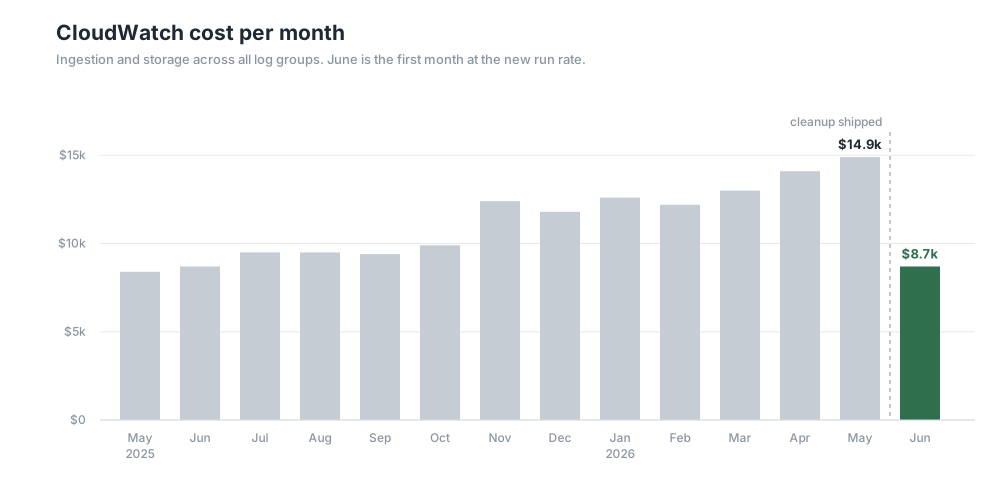
Monthly CloudWatch cost, from AWS Cost Explorer.
CloudWatch went from about $530 a day in mid-May to about $290 a day in late June: roughly $14.9k for May, trending toward $8.7k. That’s about 40% off the CloudWatch bill, around $6k a month or $70k+ a year, for a few days of work.
What we’d take from this
AI makes a whole class of investigations affordable: the ones that used to sit on the backlog because they meant weeks of tedious archaeology in the codebase. You still own the decision — which log lines earn their place in production — and the choice to run the project at all. What AI does is make the work cheap, transparent, and repeatable. The challenge is spotting the other places where that same pattern would pay for itself in days.